A knowledge base chatbot answers questions using a maintained collection of articles or documents. The useful part is not simply that it speaks naturally. It should find the right approved source, preserve the conditions in that source and know when the question needs a person or an account-specific action.
For a support team, the starting question is “Which knowledge should this audience be allowed to use?”, not “How many files can we upload?” A customer-facing bot and an internal assistant may share software while needing different source sets and access rules.
This guide covers the source and rollout decisions. Use our separate chatbot QA guide for conversation tests, or build an AI-readable knowledge base if your main goal is exposing articles to external agents rather than adding a chat experience.
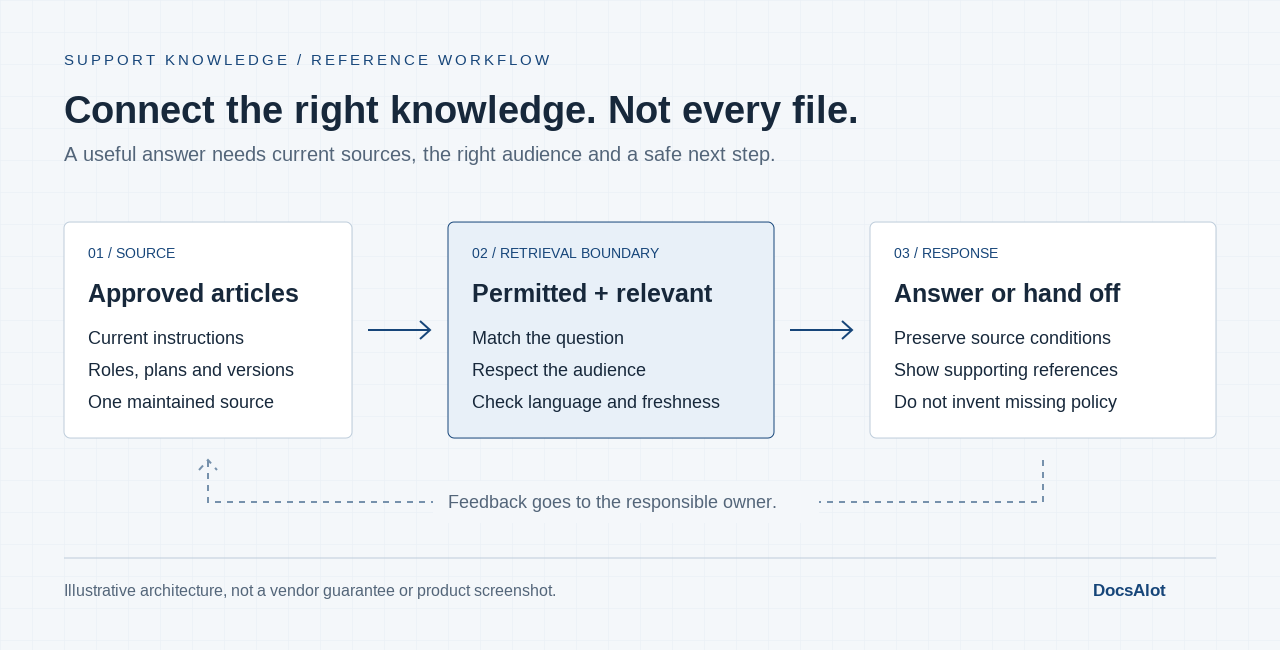
An illustrative workflow, not a product screenshot or a guarantee about any vendor's implementation.
How does a knowledge base chatbot work?
A common design uses retrieval-augmented generation, or RAG: the system searches a source collection and gives relevant material to a language model when answering. Microsoft's RAG overview describes this search-and-generation pattern. Individual products differ in how they ingest, retrieve, rank and cite content.
1Approved source article2 |3 v4Source ingestion or live retrieval5 |6 v7Question + audience -> permitted relevant content8 |9 v10Answer + supporting references, or an appropriate handoffThat diagram leaves out many implementation details on purpose. A support lead needs to establish the source, audience and owner before choosing an indexing configuration.
| Component | Support team's question |
|---|---|
| Source collection | Which version of which article is authoritative? |
| Ingestion or connector | What is copied, when is it refreshed, and what happens after deletion? |
| Retrieval | Does this question find the right page for this audience and language? |
| Generation | Does the response preserve limits and distinguish known facts from gaps? |
| Channel | Where can the answer appear, and who can read it there? |
| Handoff | What happens when an answer is unsafe, incomplete or not enough? |
Some products combine these components. Others connect a separate help center, search service and widget. “One platform” and “separate tools” are both workable arrangements if ownership is clear.
Choose customer answers or internal assistance first
Customer-facing knowledge base chatbot
Start with approved customer instructions, public policies and troubleshooting material. Check role, plan, version and language conditions. Route account-specific investigations to an authenticated workflow or a person who is authorized to handle them.
A public guide may explain how to invite a teammate. It should not reveal a particular company's member list or grant an invitation. Those require account access and separate action permissions.
Internal support assistant
Staff may need escalation procedures, approved workarounds and routing instructions that do not belong in the public help center. Decide which employees and channels can see those answers. Do not assume an internal article is automatically excluded from a customer bot merely because of its label.
For example, Intercom documents separate content availability and audience controls. Check both the product's configuration and its resulting behavior. A source's visibility in the article browser and its eligibility for AI answers are distinct concerns.
Connect sources deliberately
Use the smallest source set that can answer one real workflow. A large upload can hide conflicting policy, old product names and obsolete procedures until the bot combines them in an answer.
| Source type | Suitable starting use | Risk to review |
|---|---|---|
| Published support articles | Repeatable customer tasks | Old screenshots, missing roles, duplicate versions |
| Internal SOPs | Staff decisions and handoffs | Customer exposure or overbroad channel access |
| Product reference | Precise field, feature or API behavior | Version mismatch or technical detail without task guidance |
| Approved policy | Limits and eligibility | Expired rules or an answer that drops an exception |
| Raw tickets and chat history | A possible input for identifying knowledge gaps | Personal information, one-off exceptions and unapproved advice |
Do not use a pile of raw conversations as a substitute for maintained source articles. Extract reusable questions through your approved privacy process, resolve conflicting advice and publish a reviewed answer. The support article templates give that answer a consistent structure.
If you already use Zendesk, check the current supported knowledge-source options. A help center outside the ticketing suite does not necessarily mean replacing the inbox or writing a custom integration; verify the supported connection for your setup.
Worked example: inviting a teammate
This is a fictional product, not a DocsAlot feature specification or a customer conversation.
Suppose the authoritative public article says:
1# Invite a teammate2
3Workspace admins can send invitations from Settings > Members.4Members cannot invite people directly.5
61. Open Settings, then Members.72. Select Invite and enter the teammate's work email.83. Choose a role permitted by your workspace policy.94. Send the invitation and confirm its status is Pending.10
11If you cannot see Invite, ask your workspace admin.12If a permitted invitation fails, contact support with the error message.13Never send your password or an access token to support.
A source-grounded answer to “How do I add someone?” should mention the admin requirement, identify the task and link the article. A response that gives the steps but omits the role condition is incomplete.
| Question | Expected behavior | Why it matters |
|---|---|---|
| How do I add someone to the workspace? | Explain the documented steps and admin requirement | Correct task and applicability |
| I'm a member and cannot see Invite | Give the documented admin path, not a workaround | Permission boundary |
| Invite Sam for me | Explain the process or use a separately authorized action workflow | Knowledge is not authority to act |
| Can I invite unlimited people for free? | State that the source does not establish a plan limit | No invented commercial promise |
| What if the invitation expires? | Find a supported source or hand off | No made-up expiration period |
The point is not to make every answer longer. It is to preserve the facts that change what the reader may do.
Separate answering from taking action
Retrieving instructions is not the same as changing an account, issuing a refund or inviting a user. An action-capable agent needs a separate authorization model, safe tool behavior, confirmation where appropriate and a record of what happened.
Do not describe a read-only knowledge chatbot as automating the whole support workflow. It can answer a reusable question or help a teammate find the procedure. Account operations and ticket ownership still need explicit systems and permissions.
When evaluating a vendor, ask the team to demonstrate one knowledge answer and one action separately. Check which identity performs the action, which data it can reach, and how a failed operation is handled. If no action integration is configured, the bot should not imply that the task has been completed.
Know what keeps answers up to date
“Connected” does not mean “current.” Document the refresh behavior for each source: native article updates, scheduled website syncs, imported files and live retrieval can have different paths.
Before rollout, have an owner answer these questions:
- Where is the authoritative content edited?
- How does a published change reach the answer system?
- How do we verify the index or retrieved source contains the new version?
- What happens when an article is retired, made private or translated?
- Who responds when a refresh fails?
Test a harmless change in an approved sample article. Verify the published source, then the bot's answer and citation. Do not assume a green sync status proves every answer is using the right content. Our help-center release update workflow connects these checks to the product release process.
Check channel access, not just source links
A protected article link does not retract answer text already posted in a broad channel. If staff-only knowledge is used in Slack, everyone who can read that conversation may be able to read the response. Review guests, shared channels and the channel's actual membership before allowing internal answers there.
For DocsAlot, the internal SOP and Slack workflow describes approved-channel configuration and private-knowledge opt-in. Public fallback content should remain public. Test with non-sensitive source material before using internal procedures.
Also check logs and feedback destinations. A question can contain personal or account information even if every source article is public. Use the minimum necessary retention and access for your team's approved process.
Run a narrow pilot with a clear acceptance decision
Download the pilot worksheet (CSV) and replace the fictional invitation questions with your own. Record the expected source before asking the bot, then capture the observed outcome. The worksheet is a planning aid, not a certification or automated test suite.
Choose one workflow, one audience and an owner who can correct both the content and the setup. Include a missing-answer case and an explicit request for a person. For the detailed conversation checks, use the chatbot QA checklist.
Do not reduce the decision to an average score. Private information exposure or an unauthorized action should block the relevant rollout even if several easy questions passed. Set acceptance rules with your own risk owners and verify the destination of required handoffs.
After launch, review a sample of conversations and distinguish correct answers, failed answers, successful handoffs and abandonment. Ticket deflection is not simply the number of chats that closed without an agent.
What should you compare when choosing software?
Compare the source workflow and operating cost, not only the model name or a polished demo. Ask for the help-center publishing scope, supported connectors, private-source controls, language behavior, answer references, handoffs, refresh process, feedback and usage limits.
Price the same audience and workload in each product. A seat, an answer, an AI credit and a resolved conversation are not interchangeable units. Keep the cost of the help center separate from any usage-based answer charges and action integrations.
The AI-native help-center shortlist covers publishing options. If you need a replacement for the existing suite's knowledge layer, see Zendesk help-center migration or Intercom article migration. Neither move should start by turning off an inbox your team still needs.
Common questions
Is uploading documents the same as training a model?
Not necessarily. A retrieval-based system may index documents and supply relevant passages at answer time without changing the model's weights. Ask the provider what it stores, how it uses the content and what deletion or retention controls apply.
Do llms.txt and MCP give us a chatbot automatically?
No. They can give compatible agents discovery or retrieval access to published content. You still need an answer experience, an audience model, source configuration and handoffs for a customer support chatbot.
Can we use a separate knowledge base with our existing support platform?
Often, but verify supported source connectors and refresh behavior for the exact system. Do not assume a public URL, an MCP endpoint and a vendor's native source connector behave identically. Keep the source owner and acceptance checks explicit whichever architecture you choose.