A Mintlify alternative built for faster page loads.
Both products are docs-as-code. DocsAlot prioritizes faster page loads, agent-readable delivery, and automated upkeep, while Mintlify prioritizes live collaboration for larger writing teams.
Published design
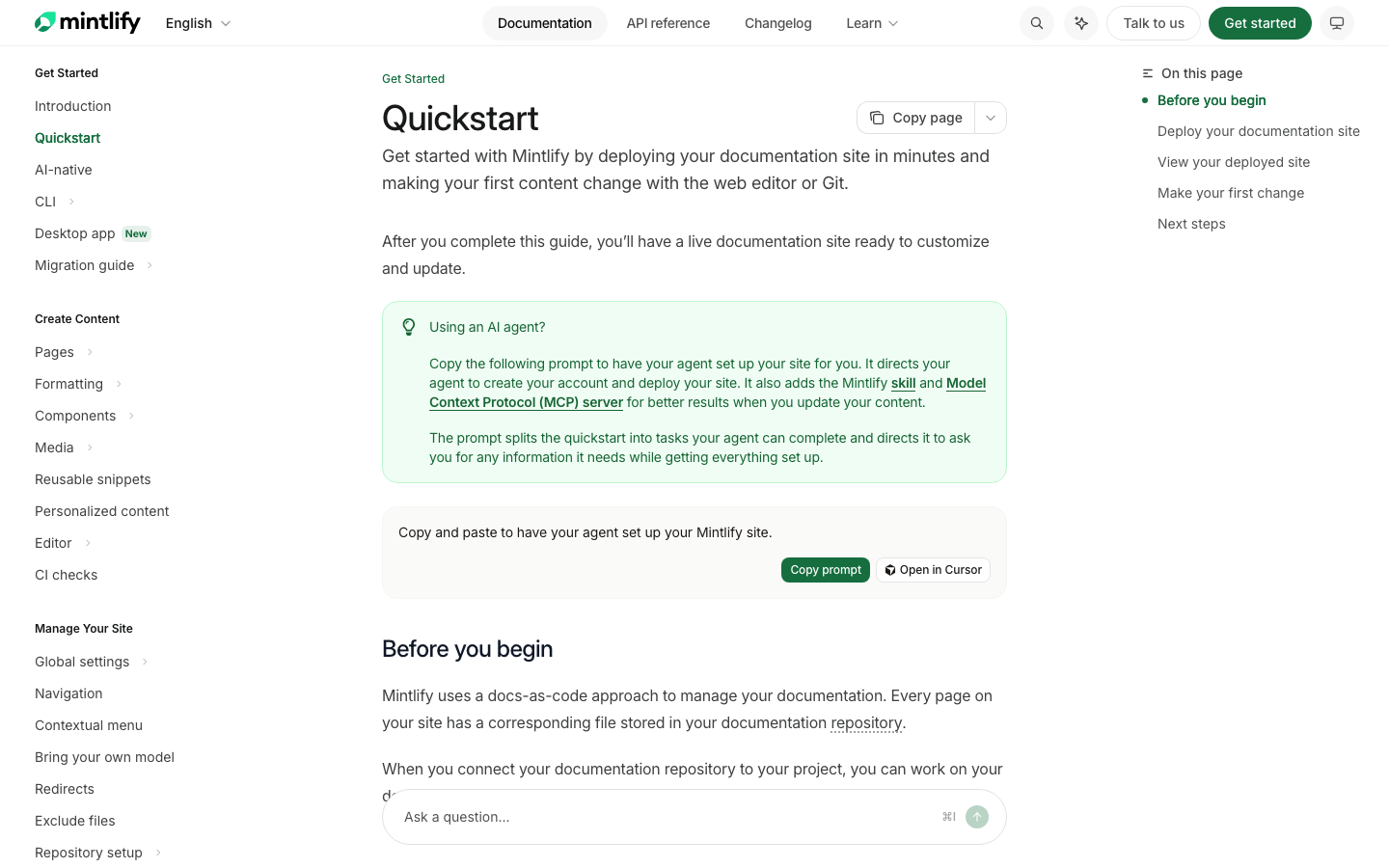
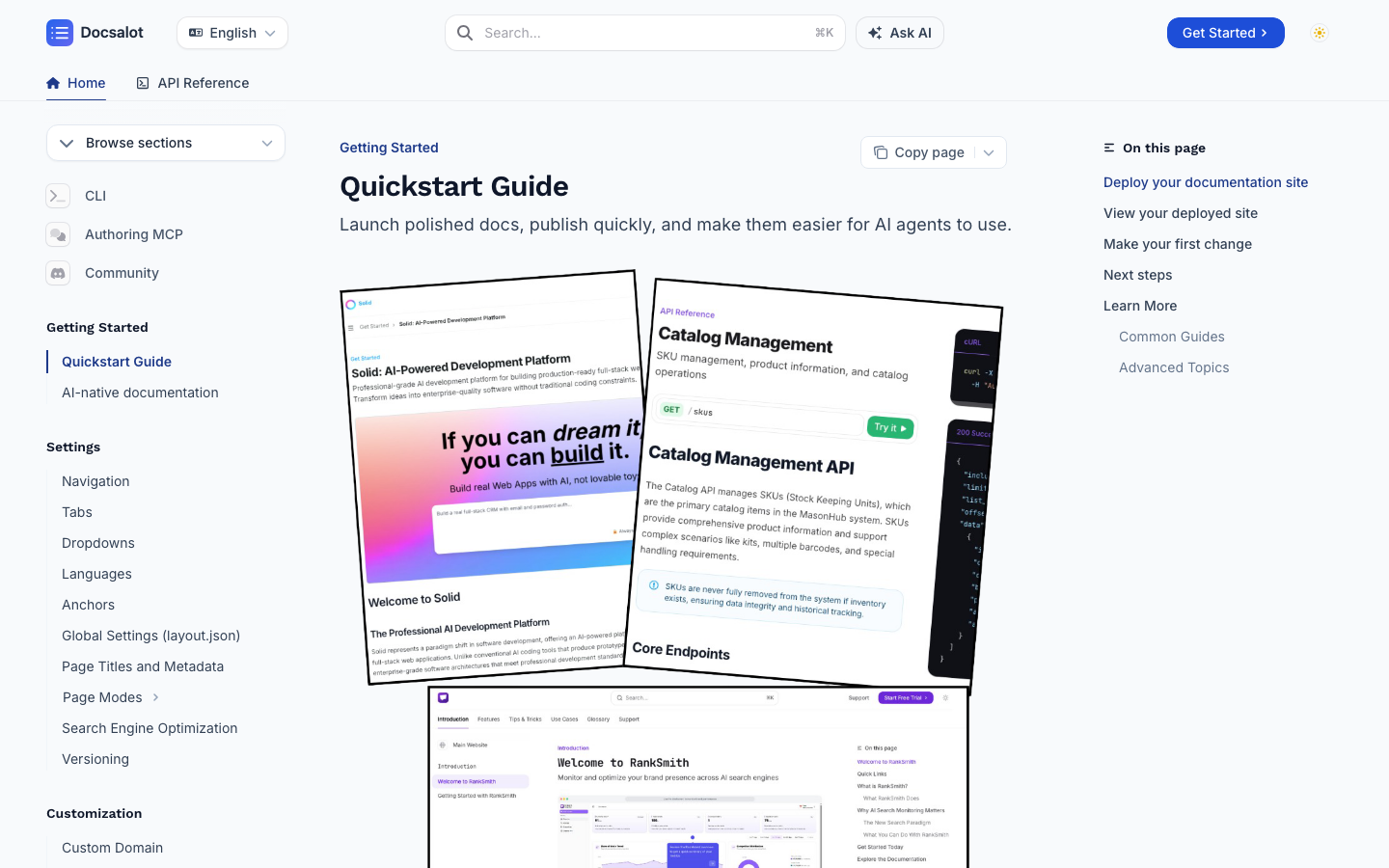
Design is similar, if not better.
Both products publish a familiar three-column documentation experience: navigation, content, and an on-page outline. The bigger difference is the workflow behind the page, not whether either platform can produce modern-looking docs.
Global mobile Lighthouse
Page-load speed comparison
A DocsAlot-hosted customer site scored 82 in our three-run mobile median. The October 17 independent report measured Mintlify's own docs from six regions, with scores ranging from 46-68 and a median of 56.
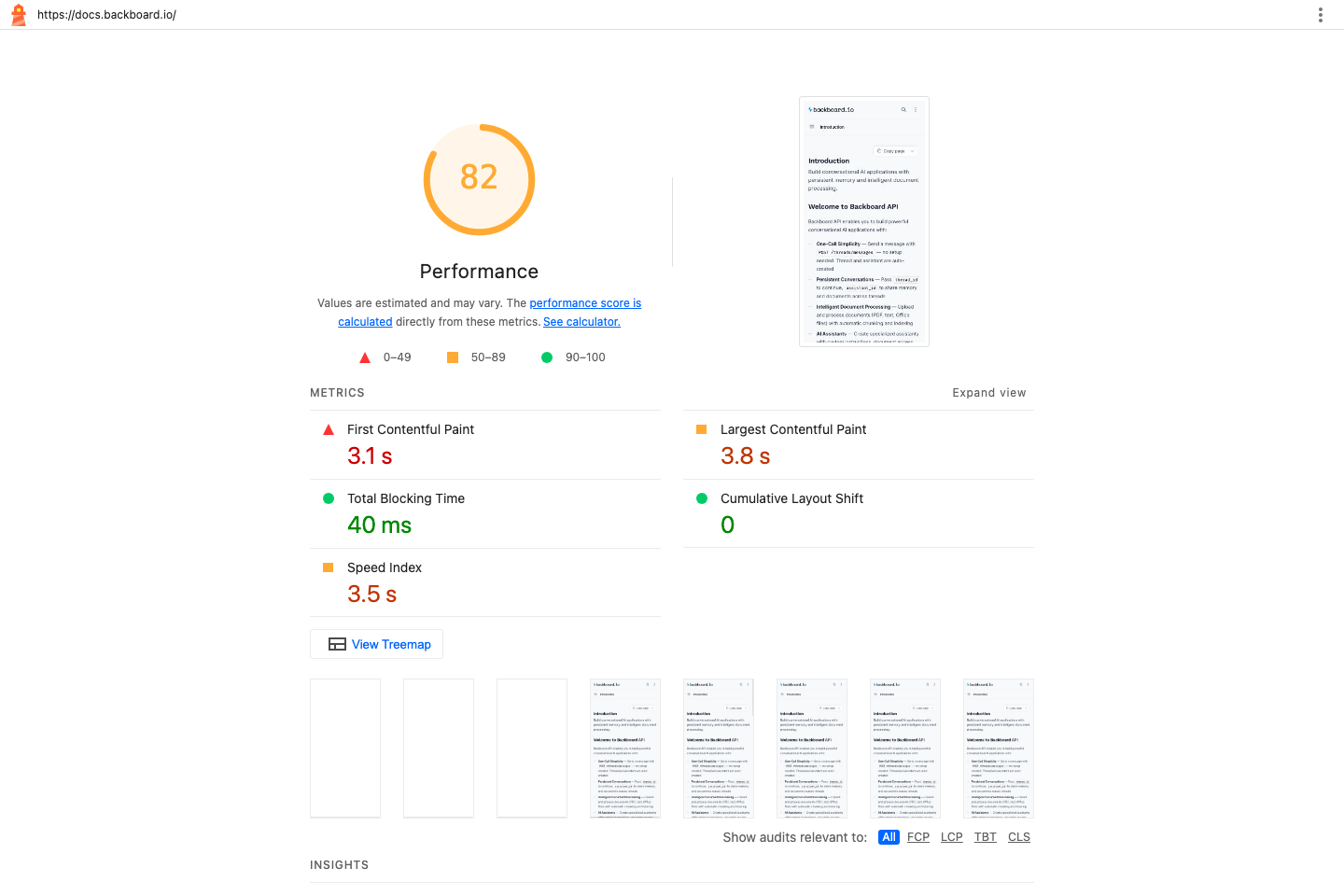
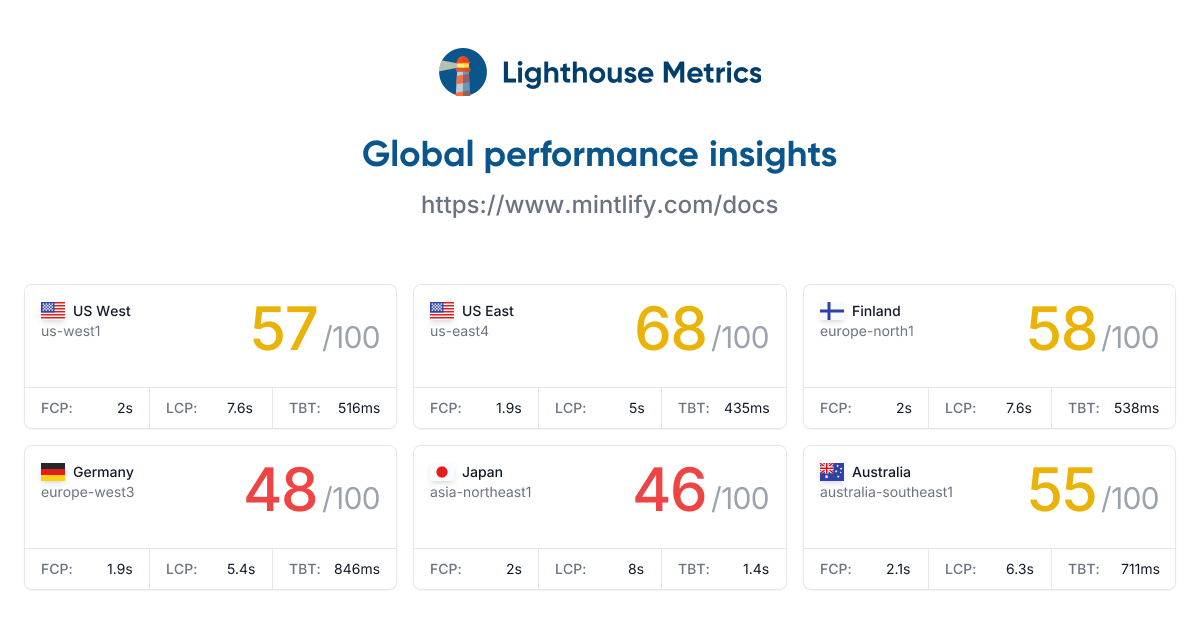
DocsAlot: Lighthouse 13.5.0, Simulated mobile, median of three cold-cache runs, . Mintlify: Mobile, one run from each of six global regions, . The dates and test designs differ, so treat the comparison as directional. Lab results vary by page and conditions.
Monthly pricing
DocsAlot Team vs Mintlify Pro pricing
Both prices are in USD on month-to-month billing, before additional usage charges.
Includes managed public and private docs, custom domains, and unlimited editors.
Billed month to month. Includes analytics, preview deployments, and 10,000 AI credits per month.
Workflow comparison
Compare what your team gets.
Swipe sideways on mobile to view the full matrix.
| Dimension | DocsAlot Team | Mintlify Pro | DocsAlot takeaway |
|---|---|---|---|
| Docs-as-code foundation | Git + browser editor | Git + browser editor | Both products support docs-as-code. Do not switch merely to get Git-backed content. |
| Real-time collaboration | Async team workflow | Live, same-page editing | Mintlify wins when several writers and agents need to work in the same page together. |
| Agentic upkeep | Source-aware agents + hosted MCP | Writing agent, Autopilot, and MCP, with 10,000 AI credits per month | Both support agent workflows. Compare the included AI capacity and overage charges for the work your team needs. |
| Published performance | 82 in a three-run mobile median | 46-68 across six regions; median 56 | The available snapshots favor the DocsAlot-hosted page. The runs used different dates and test designs, so use the linked reports as directional evidence and rerun both before procurement. |
| Migration evaluation | Free migration + one month free | Self-serve migration with the Mintlify CLI | DocsAlot lowers switching risk by starting the evaluation with your real content instead of an empty demo. |
This matrix compares DocsAlot Team with Mintlify Pro, not Mintlify Enterprise. The last column explains the tradeoffs for each workflow.
Product shape
What each product is optimized to do.
Two tools can overlap on outputs while still being built for very different documentation jobs. This is the higher-level operating-model read.
Mintlify
What Mintlify optimizes for.
Mintlify is a polished docs-as-code platform with a strong web editor, real-time same-page collaboration, Git sync, and enterprise controls. It is a strong fit when a larger documentation team will actively use that collaborative depth.
DocsAlot
What DocsAlot optimizes for.
DocsAlot is a docs-as-code platform for lean product teams that want fast published pages, AI-readable outputs, hosted MCP, and source-aware agents to handle more of the upkeep without building a documentation department.
FAQs
Questions that usually block the switch.
These are usually the questions that slow internal alignment, migration planning, or procurement once the shortlist is already real.
Will migrating from Mintlify affect the SEO or GEO performance of my existing pages?
No. We keep your existing domain and preserve the current URL paths, so readers, search engines, and AI crawlers continue reaching the same addresses. Faster page delivery can strengthen technical SEO, and on previous migrations we have seen search visibility and AI citations begin improving within 24 hours. Results vary by site, but the migration itself is designed to preserve the authority your existing URLs have already earned.
We do not have time to migrate. Can you help us?
Yes. We offer free migration. Email the URL of your current docs to faizank@docsalot.dev and we can have a DocsAlot version live within an hour. If you are migrating from a paid Mintlify tier, your first month is free. You can always go back to Mintlify.
Will our docs look the same as they do on Mintlify, including our custom design?
Yes. We can reproduce the same design in DocsAlot. DocsAlot supports the same component naming and compatible MDX patterns used by Mintlify, so the structure and presentation carry over cleanly. We also migrate custom CSS, including bespoke styling, as part of the free migration.
We created our own custom components. Will they work with DocsAlot?
If they work with Mintlify, they should work with DocsAlot. DocsAlot supports compatible MDX component patterns, and we will validate and migrate your custom components as part of the free migration.
How can I preview the docs on my computer with DocsAlot?
You can test DocsAlot locally without changing or publishing your current Mintlify site. Ask your coding agent to create a separate DocsAlot-compatible copy of the docs and start a local preview. In most cases, the only structural change is renaming the root docs.json file to layout.json; your MDX pages and components can stay in place.
- Install the DocsAlot CLI
npm install -g docsalot-cli - Install the DocsAlot skill for your coding agent
docsalot skills install - Ask your coding agent
Use the DocsAlot skill to create a separate DocsAlot-compatible copy of these docs, rename docs.json to layout.json, and start a local preview. - Or start the preview yourself
docsalot docs preview --dir <docs-directory>
Can you show me sample docs and what they would look like?
Yes. These live DocsAlot sites show API documentation, developer documentation, and product guidance published for real teams.
How is DocsAlot so fast compared with Mintlify?
Mintlify routes custom domains through Vercel, and Vercel describes Mintlify as a shared multi-tenant platform: one application and deployment serves many customer docs sites. That model can scale, but Mintlify reserves its formal performance SLA for Enterprise customers. DocsAlot takes a narrower approach to published delivery. Authoring is separated from a lean docs runtime, while each project's versioned content, configuration, and assets remain project-scoped. Published pages minimize browser work, use edge caching, and expose clean content directly to readers, search crawlers, and AI agents. The dated Lighthouse results above show the measured difference for the pages tested; actual performance still varies by page, location, and test conditions.
Does DocsAlot support Git-based documentation? We rely heavily on docs-as-code with our coding agents.
Yes. DocsAlot supports Git-backed documentation, browser editing, local previews, and publishing through the DocsAlot CLI. Install the DocsAlot skill and your coding agents can create and update documentation directly from the repository without giving up your docs-as-code workflow.
When would DocsAlot not make sense for us?
DocsAlot is built to be a documentation and DevRel copilot for small teams, especially when one or two people manage developer marketing, DevRel, and documentation together. It is probably not the right fit if you have more than two technical writers who need real-time same-page collaboration, a dedicated DevRel organization of more than five people, or healthcare requirements that depend on HIPAA compliance and a BAA. In those cases, Mintlify or a larger enterprise platform is likely the better choice today.
When does Mintlify still make more sense?
Mintlify makes more sense when several people regularly edit the same page together, a dedicated documentation team owns the program, or enterprise controls and a performance SLA justify the higher price.
Which is better for startups?
DocsAlot is a better fit for a small team that wants to keep its Git-based workflow but spend less time running the docs site. Use the visual editor or your coding agent, and preview your existing content before switching.
Customer proof
What teams say after publishing with DocsAlot.
These are DocsAlot customers and live documentation sites. They are product proof, not a claim that every customer migrated from Mintlify.
"We were looking into Mintlify/GitBook for our docs, but were disappointed. Super expensive ($300) for the value they were offering. Switched to DocsAlot and couldn't be happier."
"Fantastic stuff! The introduction perfectly nails the Mako Code's idea. I particularly enjoyed the Technical Deep Dive with its explained code snippets, and the Project Architecture's file tree was both cool and useful."
"I don't know what you did, but it's amazing. Just having our docs on DocsAlot gave us an uptick in SEO, the page-load speed is super fast, and auto-sync is a game changer."
Migration offer
Get one month free, with every feature and migration included.
We will migrate your first Mintlify project, map the existing URLs, move the content, and help publish it. Then use the complete DocsAlot platform free for one month and compare both products using your real documentation. If it does not earn the switch, you can always go back to Mintlify :)
Calendar not loading? Open booking in a new tab.
Try the workflow
Ready to test whether DocsAlot fits your documentation stack?
Run both products against the same documentation for one month. We will migrate the first project so the evaluation starts with evidence, not setup work.