ReadMe is difficult to replace when you are actually using what makes ReadMe unusual.
Its strongest product is not a collection of Markdown pages. It is a developer hub where a logged-in user can find an API key, try an authenticated request, inspect recent API activity, and troubleshoot without leaving the documentation site.
If that is the job, use a serious API portal. If the real problem is broader developer documentation, spec governance, SDK generation, maintenance cost, or source ownership, a different system may fit better.
This guide compares seven ReadMe alternatives by those use cases rather than pretending they are interchangeable.
Last verified: August 28, 2026. Product and pricing claims were checked against the official sources linked at the end.
Here is the short answer:
- Choose DocsAlot when API docs must live inside a broader documentation system that also helps keep content current.
- Choose Mintlify when polished Git-native developer docs and collaborative writing matter most.
- Choose Fern when the API specification should generate both documentation and SDKs.
- Choose Redocly when OpenAPI governance, catalogs, and controlled enterprise portals are the center of the purchase.
- Choose Scalar when you want an open-source interactive API reference that can live inside your own application.
- Choose GitBook when mixed technical and non-technical contributors need a strong visual editor.
- Choose Docusaurus when a React team wants to own the documentation stack.
If your shortlist is already down to two products, read the direct DocsAlot vs ReadMe comparison.
ReadMe Alternatives at a Glance
| Rank | ReadMe alternative | Best for | Main tradeoff |
|---|---|---|---|
| 1 | DocsAlot | Automated API and developer docs that also cover product guides and onboarding | Does not reproduce ReadMe's personalized developer dashboard |
| 2 | Mintlify | Polished Git-native developer docs and collaborative writing | Higher paid-plan pricing and less emphasis on per-developer API telemetry |
| 3 | Fern | Generating SDKs and API references from the same specification | More API-infrastructure oriented than a broad product-docs system |
| 4 | Redocly | OpenAPI governance, catalogs, linting, and enterprise API portals | A heavier API-program purchase when a team mainly needs clear docs |
| 5 | Scalar | Open-source interactive API references embedded in an existing stack | Your team owns more of the surrounding docs site and operation |
| 6 | GitBook | Mixed product knowledge with a strong browser editor | Less specialized around personalized API usage and debugging |
| 7 | Docusaurus | Self-hosted React documentation with complete source ownership | Hosting, search, API rendering, upgrades, and upkeep stay with engineering |
Start With the Reason You Are Leaving ReadMe
ReadMe's current Starter plan is free. Pro is $250/month, and Enterprise uses custom pricing. Starter already includes an interactive API reference, custom domains, bidirectional Git sync, usage metrics, llms.txt, and an MCP server. Pro adds reviews, branches, custom HTML and CSS, reusable content, AI linting, and more advanced writing tools.
That makes “ReadMe is expensive” an incomplete reason to switch. The right question is what you are paying ReadMe to do.
Use these evaluation criteria:
- API interaction: Do users need to make authenticated requests from the docs?
- Personalization: Should the portal display each user's keys, logs, or usage?
- Specification workflow: Is OpenAPI only an input, or the source of truth for governance and generation?
- Content breadth: Do the same docs need to cover product concepts, onboarding, tutorials, and support?
- Maintenance model: Who notices when the code changes but the guide does not?
- Agent access: Can coding agents retrieve the current docs and API schema without scraping HTML?
- Ownership: Do you want managed software, an API platform, or a framework your engineers operate?
The best ReadMe alternative is the one that changes the part of this operating model you actually dislike.
1. DocsAlot
Best for: teams that need interactive API documentation inside a broader, automation-first docs system.
DocsAlot combines OpenAPI-backed endpoint references, interactive requests, product and onboarding guides, Git-connected authoring, a browser editor, Markdown delivery, llms.txt, skill.md, and hosted MCP. Its main difference from ReadMe is not that it can render an endpoint. Both products can do that. The difference is what happens around the endpoint.
DocsAlot is designed for a documentation program where code, website context, product guides, and API references need to stay aligned. It can suggest changes when the product moves, while a human still reviews what ships. That is useful when the API portal is only one part of the customer journey.
Choose DocsAlot when:
- the same site must cover API reference, onboarding, product guides, and technical support
- documentation drift is more painful than portal customization
- human and AI readers need clean Markdown and structured retrieval paths
- a fixed
$99/monthTeam plan is easier to budget than a larger API-portal purchase - the team wants hands-on migration and redirect support
Stay with ReadMe when personalized API keys, per-developer logs, and a deeply instrumented developer dashboard are central requirements. DocsAlot is a broader docs operation, not a clone of that experience.
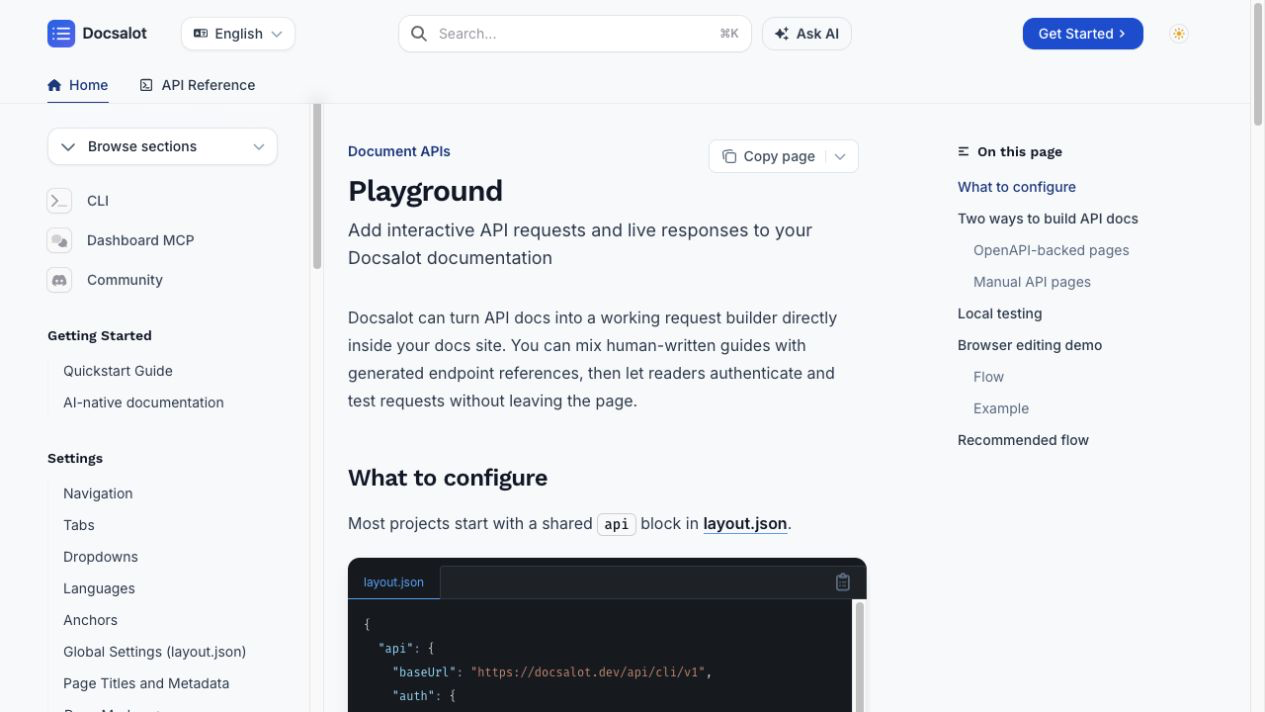
A current DocsAlot API playground guide. OpenAPI-backed reference pages and human-written guides can live in the same documentation hierarchy.
For the direct pricing, workflow, and migration analysis, read the ReadMe alternative comparison.
2. Mintlify
Best for: developer-focused teams that want polished hosted docs with a Git-native authoring model.
Mintlify is a strong ReadMe alternative when the public developer experience matters but personalized API telemetry does not. It supports developer guides, OpenAPI references, a web editor, Git workflows, an assistant, llms.txt, skill.md, and hosted MCP access.
Choose Mintlify when:
- developers and technical writers already work in Git
- design quality and collaboration are major buying criteria
- the docs include substantial guides alongside the API reference
- agent-readable outputs and MCP should be hosted for you
The tradeoff is price and focus. Mintlify Pro is publicly listed at $450/month with annual billing or $540/month monthly as of the verification date. It also does not make ReadMe's developer dashboard, personalized keys, and API logs its main product.
Read next: Mintlify vs ReadMe.
3. Fern
Best for: API companies that want documentation and generated SDKs to share one specification.
Fern is a better alternative when the API definition sits at the center of the system. It accepts OpenAPI, AsyncAPI, OpenRPC, gRPC, or Fern definitions and can generate SDKs and documentation from those sources.
That changes the failure mode. Instead of separately maintaining an API reference and several client libraries, the spec produces both. Fern also serves per-page Markdown, generates llms.txt, and can host an MCP server for the published documentation.
Choose Fern when:
- generated SDKs are part of the developer-experience roadmap
- the specification should drive docs, examples, and client libraries
- API reference consistency matters more than general knowledge management
- engineers are comfortable with a spec-first workflow
The tradeoff is category breadth. Fern is excellent API infrastructure. A team with broad product education, support documentation, and many non-API pages may still need a wider content operation.
Read next: DocsAlot as a Fern alternative.
4. Redocly
Best for: organizations that need API governance as much as API documentation.
Redocly is the strongest ReadMe alternative here when the purchasing question begins before publishing. Its Realm product spans OpenAPI content, Markdown documentation, catalogs, scorecards, governance, access control, search, and MCP servers.
Choose Redocly when:
- several teams publish APIs and need consistent governance
- lint rules, catalogs, access control, and API quality gates matter
- OpenAPI is an organizational asset rather than a file uploaded to a docs tool
- private or enterprise API portals need stronger controls
The tradeoff is complexity. A small team that needs one attractive API reference may be buying more system than it needs. ReadMe often remains simpler when the goal is a polished developer hub; DocsAlot is simpler when broader upkeep is the problem.
Read next: DocsAlot as a Redocly alternative.
5. Scalar
Best for: teams that want an open-source interactive API reference inside an existing product or docs stack.
Scalar takes an OpenAPI document and produces an interactive API reference, API client, SDKs, and an MCP server. Its reference renderer and API client are MIT licensed, and it supports more than 35 framework integrations.
Choose Scalar when:
- the team already has a website or documentation shell
- embedding the API reference into Express, FastAPI, Next.js, Rails, or another application is preferable to adopting a full docs vendor
- open-source ownership and self-hosting matter
- the OpenAPI document should also drive an API client or generated SDKs
The tradeoff is the boundary of the product. Scalar can solve the API reference extremely well. Your team still has to decide where conceptual guides live, how search works, who owns redirects, and how the broader documentation stays current.
Read next: DocsAlot as a Scalar alternative.
6. GitBook
Best for: teams that need API docs inside a broader collaborative knowledge system.
GitBook is a good ReadMe alternative when the API is not the only content type and many contributors prefer a browser editor. It combines a block editor, Git Sync, API references, public and private documentation, Markdown versions of pages, llms.txt, and hosted MCP.
Choose GitBook when:
- product managers, support, and technical writers all contribute
- the visual editing experience is a top requirement
- public docs, internal knowledge, and API reference should share a platform
- per-developer API logs are less important than content collaboration
The tradeoff is specialization. GitBook can host an API reference, but ReadMe is more deliberate about the personalized developer hub and API troubleshooting experience.
Related guide: the best GitBook alternatives by use case.
7. Docusaurus
Best for: React teams that want a self-hosted docs-as-code stack.
Docusaurus is not a managed ReadMe replacement. It is an open-source React static-site generator. With an OpenAPI plugin or an embedded renderer such as Scalar, it can host guides and API references in a repository your team completely controls.
Choose Docusaurus when:
- source ownership is a hard requirement
- React customization is worth ongoing engineering time
- the team wants to own hosting, builds, redirects, and analytics
- documentation versions need to track software releases
The tradeoff is labor. There is no large SaaS bill, but there is also no vendor owning upgrades, search, authentication, API-console behavior, or the maintenance system around the content.
Read next: ReadMe vs Docusaurus.
Which ReadMe Alternative Should You Choose?
Use the actual constraint:
- Broader docs and less maintenance: DocsAlot.
- Polished Git-native developer docs: Mintlify.
- SDK generation from the API spec: Fern.
- Enterprise OpenAPI governance: Redocly.
- Embeddable open-source API reference: Scalar.
- Mixed-contributor visual editing: GitBook.
- Complete React and hosting ownership: Docusaurus.
Keep ReadMe if personalized keys, real API logs, and a developer dashboard are what your customers need. Switching because another product has a nicer homepage is an expensive way to discover that you removed the feature users actually relied on.
A Practical Migration Checklist
Before moving from ReadMe:
- Export every guide, reference definition, recipe, changelog entry, and asset.
- Inventory indexed URLs before changing the information architecture.
- Identify personalized features that cannot be represented as static content.
- Test authentication, server variables, and “try it” behavior against the real API.
- Create one-to-one permanent redirects for every public URL that changes.
- Preserve titles, descriptions, canonicals, and structured data where appropriate.
- Run the old and new portals in parallel long enough to test common user journeys.
- Monitor Search Console, API-support volume, and time to first successful call after launch.
The content export is usually the easy part. Reproducing the developer workflow and preserving search equity are the parts that deserve a plan.
FAQ
What is the best ReadMe alternative in 2026?
DocsAlot is the strongest alternative when the team wants API docs inside a broader automated documentation system. Fern is stronger when SDK generation is central. Redocly is stronger for API governance. Scalar is stronger for an embeddable open-source API reference. Keep ReadMe when personalized API keys and usage logs are central.
Is there a free ReadMe alternative?
Scalar's API reference renderer and client are open source, and Docusaurus is an open-source documentation framework. Both can avoid a software subscription, but your team owns implementation and operations. ReadMe itself also has a free Starter plan, so compare total workflow cost rather than license price alone.
Which ReadMe alternative is best for OpenAPI?
Use Fern when OpenAPI should generate SDKs and documentation. Use Redocly when linting, governance, and catalogs matter. Use Scalar when you want an embeddable interactive reference. Use DocsAlot when OpenAPI reference pages must live beside broader product and onboarding content.
Which ReadMe alternative is best for AI agents?
DocsAlot, Mintlify, GitBook, Fern, ReadMe, Redocly, and Scalar now expose meaningful AI-facing surfaces such as Markdown, llms.txt, MCP, or generated tools. The better question is whether agents can only read the docs or can also participate safely in keeping them current.
Can I migrate from ReadMe without losing organic traffic?
Yes, if you preserve content intent and redirect every changed URL. Export the current URL inventory, create direct permanent redirects, retain metadata, publish the new sitemap, and monitor Search Console for indexing and canonical changes.
Sources Checked
- ReadMe plans and pricing
- ReadMe API exploration tools
- ReadMe Developer Dashboard
- ReadMe AI discoverability
- ReadMe MCP server
- Mintlify AI-native documentation
- Fern documentation for developers and agents
- Redocly pricing
- Redocly AI-ready documentation
- Scalar OpenAPI documentation
- GitBook LLM-ready docs
- Docusaurus versioning
- DocsAlot pricing