The best GitBook alternative depends on which part of GitBook you are replacing.
This guide compares seven GitBook alternatives by the job each one is built to do. GitBook is not just a wiki anymore: it combines a strong visual editor, Git Sync, public and private documentation, API docs, AI features, and a polished hosted site. A useful shortlist should therefore compare operating models, not seven products that all look the same in a screenshot.
Last verified: August 28, 2026. Product positioning and public pricing claims were checked against the official sources linked at the end.
Here is the short answer:
- Choose DocsAlot when you want automated upkeep, AI-readable docs, API documentation, and predictable fixed pricing.
- Choose Mintlify when a polished Git-native developer-docs workflow and live writer collaboration matter most.
- Choose Fern when SDK generation and API specifications are the center of the system.
- Choose ReadMe when the developer portal and interactive API experience are the product.
- Choose Docusaurus when an experienced React team wants full open-source ownership.
- Choose Fumadocs when a Next.js team wants a composable framework rather than hosted software.
- Choose Document360 when support knowledge, governance, and internal documentation matter more than developer workflows.
If your decision is already down to two products, skip the shortlist and read the direct DocsAlot vs GitBook comparison.
GitBook Alternatives At A Glance
| Rank | GitBook alternative | Best for | Main tradeoff |
|---|---|---|---|
| 1 | DocsAlot | Automated developer docs, AI-readable delivery, hybrid editing, and fixed pricing | Newer platform than GitBook |
| 2 | Mintlify | Polished Git-native developer docs and larger writing teams | Higher paid-plan pricing |
| 3 | Fern | API-first teams that need SDK generation and reference docs together | Less suited to general product and support docs |
| 4 | ReadMe | Interactive API portals and developer dashboards | More specialized around API programs |
| 5 | Docusaurus | Open-source React teams that want complete ownership | Your team owns hosting, search, upgrades, and maintenance |
| 6 | Fumadocs | Next.js teams building a custom documentation product | A framework, not a managed documentation operation |
| 7 | Document360 | Governed knowledge bases, support docs, and internal knowledge | Heavier knowledge-management model and custom pricing |
How We Evaluated The Options
This is not a generic software directory. Each product was evaluated against the jobs that bring teams to GitBook:
- Can technical and non-technical contributors both edit comfortably?
- Can the system support product docs and serious API documentation?
- Does it work with Git, a browser editor, or both?
- Who is responsible for keeping the content current?
- Can humans and AI agents consume the published documentation cleanly?
- Does the pricing model stay understandable as sites and contributors grow?
- How much migration, hosting, search, redirect, and framework work remains with the customer?
That last question matters. A lower software bill can still produce a more expensive documentation system if engineers have to own the entire stack.
1. DocsAlot
Best for: teams that want a GitBook alternative built around automated documentation upkeep rather than editor polish alone.
DocsAlot combines hosted public docs, a browser editor, Git-connected workflows, API references, llms.txt, skill.md, hosted MCP, and documentation automation. It is the closest option here for a team that likes GitBook's broad surface but wants the system to take on more of the maintenance work.
DocsAlot Team is $99/month. GitBook's public annual rates start at $65/site/month for Premium or $249/site/month for Ultimate, plus $12/user/month. That means three Premium users cost $101/month, while three Ultimate users cost $285/month. The more important distinction, however, is the operating model: DocsAlot is designed to use code, website, and product context to help keep docs current.
Choose DocsAlot when:
- documentation drift is a bigger problem than initial publishing
- API docs and product guides need one hosted home
- engineers want Git while other contributors need a browser editor
- AI-readable outputs and hosted MCP are part of the requirement
- the team wants hands-on migration and redirect support
- fixed pricing is easier to budget than site plus user pricing
GitBook remains the safer choice when its block editor is the primary requirement or a large writing team needs a mature editor-first knowledge workflow.
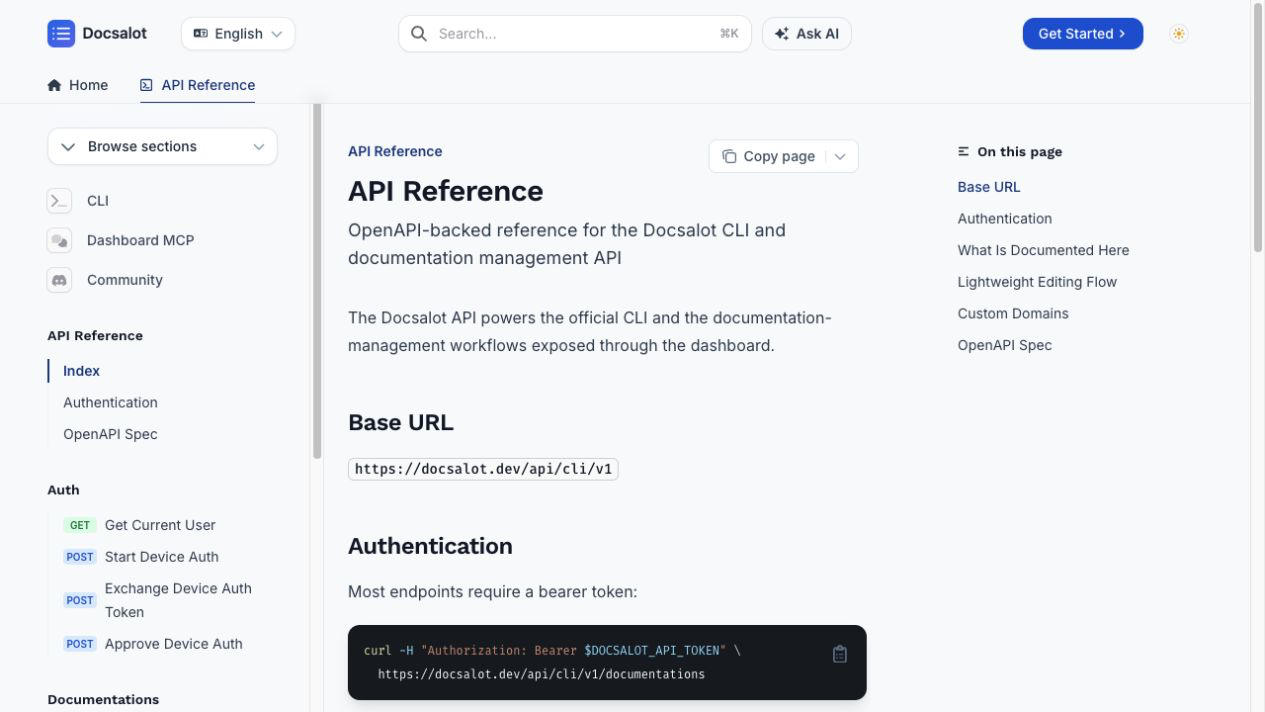
A current DocsAlot API reference. It combines the reading experience, structured endpoint navigation, code examples, search, and Ask AI in the same hosted documentation surface.
For the exact feature, pricing, and migration breakdown, read the GitBook alternative comparison.
2. Mintlify
Best for: developer-focused teams that want polished Git-native docs and strong collaborative editing.
Mintlify is a better GitBook alternative when the docs program is centered on a repository and the public developer experience matters more than broader internal knowledge management. Its current product includes hosted developer docs, API references, Git sync, a web editor, an assistant, automations, and MCP support.
Choose Mintlify when:
- developer docs are the main public surface
- Git-native ownership is a deliberate team preference
- several writers need a polished collaborative environment
- higher paid-plan pricing is acceptable
The tradeoff is cost and operating model. Mintlify Pro is publicly shown at $450/month with annual billing or $540/month on monthly billing as of the verification date. It can be a strong product and still be too much platform for a lean documentation team.
Related comparison: DocsAlot as a Mintlify alternative.
3. Fern
Best for: API-first companies where SDK generation is as important as documentation.
Fern starts from an API definition and can generate SDKs and documentation from OpenAPI, AsyncAPI, OpenRPC, gRPC, or Fern definitions. That makes it a stronger alternative when the actual purchase is an API delivery system rather than a general knowledge platform.
Choose Fern when:
- the API specification is the source of truth
- generated SDKs must stay aligned with reference docs
- dynamic SDK examples are important
- the team is comfortable with a technical, spec-driven workflow
The tradeoff is breadth. Fern is excellent when API infrastructure is the center of gravity. It is less direct when the organization also needs broad product guides, support content, internal knowledge, and a mixed-contributor CMS.
Related comparison: DocsAlot as a Fern alternative.
4. ReadMe
Best for: API portals with interactive requests, developer accounts, and usage context.
ReadMe is the most relevant GitBook alternative when the documentation site is really a developer hub. Its product is built around API references, guides, interactive requests, developer dashboards, API keys, logs, and personalized API usage.
Choose ReadMe when:
- reducing time to first API call is the main goal
- users should test endpoints in the documentation
- authenticated developers need keys and request history
- API analytics belong inside the developer experience
The tradeoff is specialization. ReadMe is not usually the first choice for a broad company knowledge base or for teams primarily trying to automate documentation maintenance.
Related comparison: DocsAlot as a ReadMe alternative.
5. Docusaurus
Best for: experienced React teams that want an open-source documentation site they fully control.
Docusaurus turns Markdown or MDX into a React documentation site and includes established patterns for versioning, localization, search, and customization. It is the clearest option for teams that want to own a full docs-as-code workflow instead of using a hosted documentation vendor.
Choose Docusaurus when:
- source ownership and open-source software are hard requirements
- React-level customization is worth the engineering time
- docs versions need to track software releases
- the team can own hosting, upgrades, search, redirects, and observability
The tradeoff is hidden labor. Docusaurus has no SaaS subscription, but it does not remove the cost of building and operating the site.
Read next: Docusaurus vs GitBook.
6. Fumadocs
Best for: Next.js teams that want a composable documentation framework inside their existing application stack.
Fumadocs provides a React documentation framework with search, content-source adapters, Markdown extensions, UI components, and OpenAPI tooling. It is a strong choice when documentation should feel like part of a custom Next.js product rather than a separate hosted system.
Choose Fumadocs when:
- Next.js or another supported React framework is already the house stack
- the team wants headless or deeply customizable UI
- engineering is comfortable composing the documentation system
- open-source control matters more than managed operations
The tradeoff is the same category boundary as Docusaurus: you are choosing a framework. Your team still owns the implementation and long-term maintenance.
Related comparison: DocsAlot as a Fumadocs alternative.
7. Document360
Best for: support organizations and larger teams that need a governed knowledge platform.
Document360 belongs on this list because many GitBook evaluations are not really about developer docs. They are about public help centers, internal knowledge, editorial governance, analytics, permissions, and reducing support tickets.
Choose Document360 when:
- support and internal knowledge are the main content types
- review workflows, governance, and reusable content are central
- the organization needs public and private knowledge bases
- custom enterprise packaging is acceptable
The tradeoff is weight. Document360 is a broader knowledge-management purchase with custom pricing. It is not the lightest answer for a small developer-docs team.
Read next: GitBook vs Document360.
Which GitBook Alternative Should You Choose?
Use the team shape, not the feature count, to decide:
- Lean product or engineering team: DocsAlot.
- Large developer-docs writing team: Mintlify.
- API platform team generating SDKs: Fern.
- API product with developer accounts and usage data: ReadMe.
- React team seeking complete ownership: Docusaurus.
- Next.js team building a custom docs product: Fumadocs.
- Support or knowledge-management organization: Document360.
If GitBook and DocsAlot are the final two, use the direct DocsAlot vs GitBook analysis. It includes current pricing examples, an operating-model comparison, and a migration checklist.
FAQ
What is the best GitBook alternative in 2026?
DocsAlot is the strongest direct GitBook alternative for a lean technical team that wants automated upkeep, API docs, AI-readable delivery, Git plus browser editing, and fixed pricing. Mintlify is stronger for a larger Git-native writing team. Document360 is stronger for formal knowledge management.
Is there an open-source alternative to GitBook?
Docusaurus and Fumadocs are strong open-source alternatives. Docusaurus is a mature React static-site generator with versioning and localization. Fumadocs is a more composable React documentation framework with strong Next.js support. Both require engineering ownership.
Which GitBook alternative is best for API documentation?
Use Fern when SDK generation and API specifications are central. Use ReadMe when the interactive developer portal is the product. Use DocsAlot when API docs need to live beside product guides, AI-readable outputs, and automated documentation upkeep.
Is GitBook cheaper than DocsAlot?
It depends on the GitBook tier and contributor count. At GitBook's public annual rates verified August 28, 2026, Premium is $65/site/month plus $12/user/month, so three users cost $101/month. Ultimate is $249/site/month plus users. DocsAlot Team is a flat $99/month.
Can I migrate GitBook content without losing SEO traffic?
Yes, if the migration preserves or redirects every indexed URL. Export the content and assets, inventory the current paths, map the new information architecture, create one-to-one permanent redirects, preserve metadata, publish a sitemap, and monitor Search Console after launch.