The right HelpDocs alternative depends on whether you need a better help center, a full ticketing system, or documentation that also serves developers. Those are different purchases. A ticketing suite is not automatically better at public docs, and a docs platform will not route your support queue.
This is a shortlist for someone who already knows what HelpDocs does. HelpDocs is a capable support knowledge base with a browser editor, search, AI tools, an MCP server, Markdown article output, and llms.txt. Its monthly pricing starts at $129/month. We would not leave HelpDocs just to get one of those features.
Last checked: October 31, 2026. Vendor capabilities and pricing can change; the official product pages are linked throughout.
| If the problem is... | Start with... | Why |
|---|---|---|
| Support articles are becoming product and developer documentation | DocsAlot | One published docs system for guides, API references, and agent-readable content |
| Tickets and conversations need a shared team inbox | Help Scout Docs | Its knowledge base sits beside a real support inbox |
| A large knowledge program needs workflow and governance | Document360 | Deep review, access, analytics, and knowledge-management controls |
| A dedicated knowledge base needs careful access control | KnowledgeOwl | A focused KB with private and public readers |
| Writers and developers need a mature editor plus Git Sync | GitBook | Strong visual authoring and repository workflows |
| You need ticket routing, channels, and a help center together | Zendesk | Ticketing is the center of its support suite |
If you only want to compare DocsAlot and HelpDocs, the direct HelpDocs comparison is more useful than a six-product list.
1. DocsAlot: when the help center becomes product documentation
HelpDocs is strongest when support owns the knowledge base. DocsAlot becomes interesting when the same public site must explain onboarding, product workflows, APIs, and integration steps to both people and coding agents. You can edit visually, use Markdown and Git-connected workflows, review a draft, and publish a hosted docs site. That does not replace your ticketing system; it gives reusable answers a home outside the inbox.
The editor is part of the decision, not just a way to upload articles. Support or product teams can write a guide visually, while engineers retain control of technical content. The image below is a local DocsAlot visual-component sandbox, not a screenshot of a customer's workspace. It shows editable cards, tabs, code examples, and FAQs; the published MasonHub example below shows the reader-facing result.
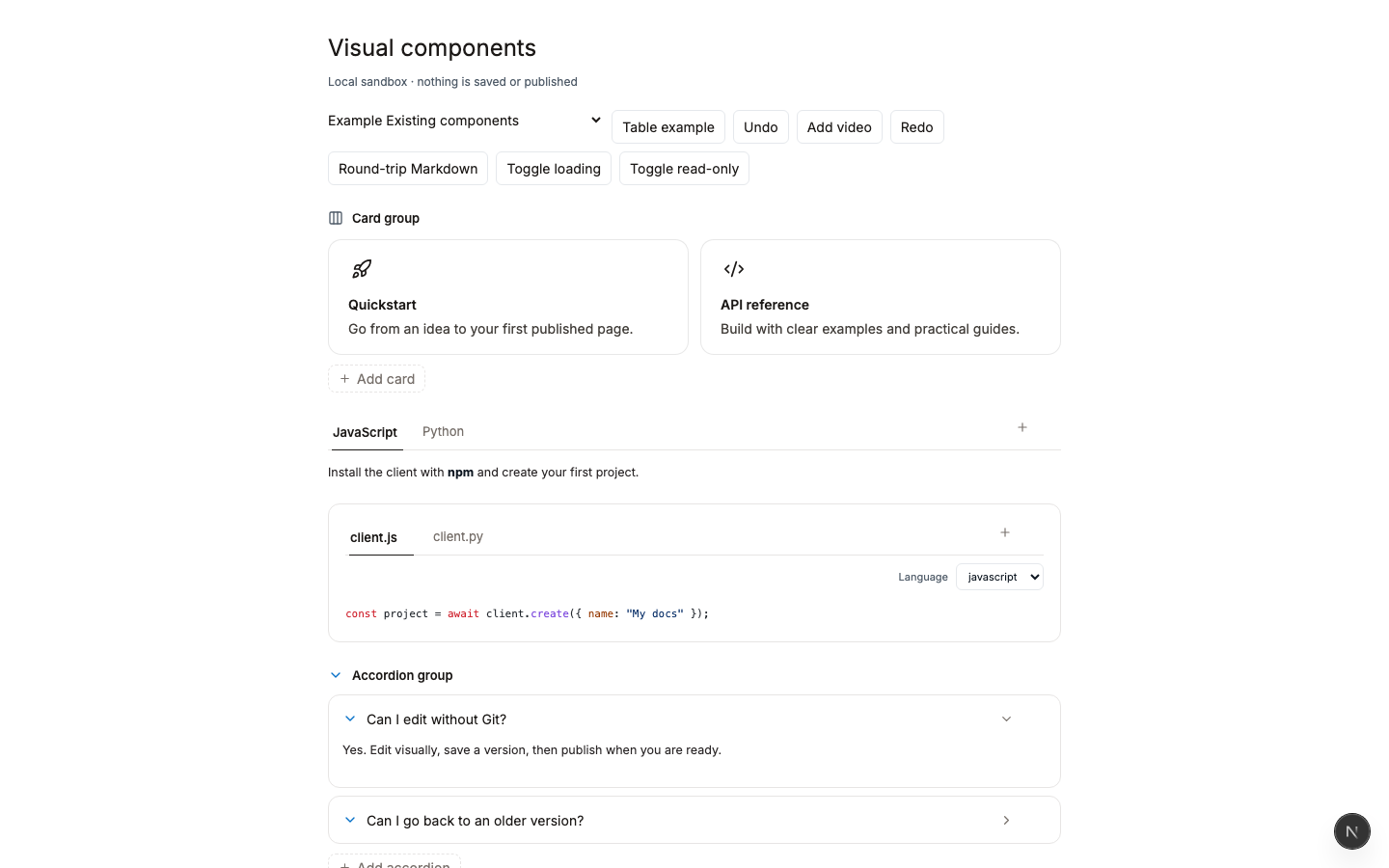
Editor component demo, captured October 31, 2026. It is a sandbox, not a customer's workspace.
MasonHub migrated its documentation from HelpDocs to DocsAlot. Its live ERP integration playbook shows the published result on a customer domain. Navigation leads from getting started to integration flows, sandbox testing, production readiness, and troubleshooting. The site also offers a support contact path. That is the split many teams need: documentation handles repeatable integration questions, and a support channel remains available for the cases that need a person.
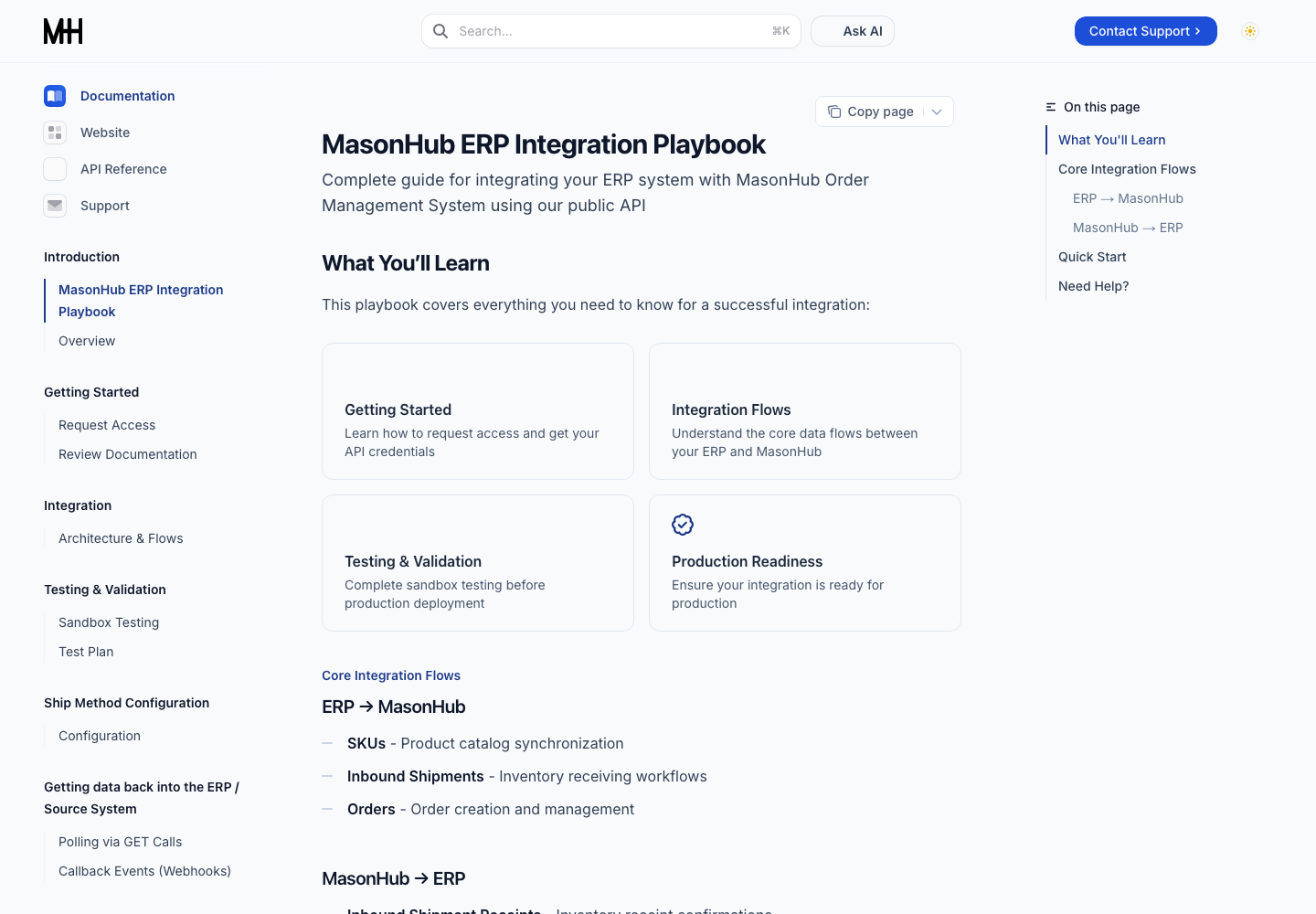
Live MasonHub public docs after its HelpDocs-to-DocsAlot migration, captured October 31, 2026. The image shows the current site, not a before-and-after performance result.
Choose DocsAlot when one small team owns support content and technical docs, cares about how the site looks, and wants to keep that content readable by both users and agents. See the exact HelpDocs comparison or try the editor.
2. Help Scout Docs: when support conversations are the product
Help Scout combines an inbox, workflows, live chat, and Docs knowledge bases. That is a different center of gravity from a standalone documentation platform. It makes sense if the daily job is assigning, answering, and following up on customer conversations, with self-service articles next to them.
Choose Help Scout over DocsAlot when you need the inbox itself. Choose a docs-first platform alongside Help Scout if your developer or product documentation needs more depth than support articles.
3. Document360: when knowledge governance is the main purchase
Document360 supports public and private knowledge bases, Markdown and WYSIWYG editing, review workflows, analytics, embedded help, and API documentation. It now advertises MCP too, so a comparison that says it cannot serve agents would be outdated. Its pricing is tailored to a team's configuration rather than a single public flat rate.
Choose it when article lifecycle, permissions, analytics, and a broad knowledge program matter more than the leanest publishing workflow. For a small team that primarily needs public product docs, evaluate whether that governance is worth the added buying process.
4. KnowledgeOwl: when a dedicated KB is enough
KnowledgeOwl is a focused knowledge-base product with public and private readers, theme support, access controls, and migration help. Its public Basic plan starts at $100/month and includes one author and one knowledge base, with extra authors and knowledge bases priced separately.
This is worth a look when your main job is a controlled, searchable knowledge base rather than API-first documentation or a ticketing suite. It is not a substitute for a support inbox either.
5. GitBook: when editor and Git workflow come first
GitBook offers both a visual editor and Git Sync. It is a good fit when writers and engineers share documentation ownership and the content lives close to a repository. GitBook can serve support content, but its strengths are broader collaborative documentation, not handling tickets.
If you are evaluating that workflow, compare the published site, collaboration model, and maintenance work, not just the editor screenshot. See our GitBook alternatives guide for the wider shortlist.
6. Zendesk: when you need the whole support operation
Zendesk places ticketing, agent workspace, and help center in one suite. If your biggest gap is routing, SLAs, multiple channels, or agent workflow, that is a more relevant purchase than switching documentation platforms. Zendesk also lets agents create or request articles while working on tickets.
The honest comparison is not "Zendesk or DocsAlot for tickets." DocsAlot does not manage a queue. It can be the public product-docs layer next to a system that does.
A low-risk way to evaluate a switch
Pick one existing help article that attracts repeat questions, one onboarding guide, and one page with a technical example. Try them in the candidate editor, then preview the published result on mobile and desktop. Check the real buyer concerns: navigation, search, code examples, screenshots, URL mapping, and who updates the pages next month.
Keep your current help desk running during the test. If the docs are moving to a new host, map the existing custom domain and valuable URLs before changing DNS. Our documentation migration checklist covers that sequence. For a quick DocsAlot evaluation, open the editor or review the HelpDocs-to-DocsAlot comparison.
For the workflow behind this decision, read how a help-desk knowledge base works alongside tickets and see real knowledge-base examples.